
How to Set Up Your Shift4 Card Machine: A Simple UK Guide
31 August 2026 · 17 min read

Imagine standing behind your counter with a queue forming, staring at a new piece of technology and wondering if it's going to work or just leave you frustrated. Most business owners dread the moment they have to "plug and play" because, in reality, it rarely feels that simple. You've likely worried about connectivity issues whilst serving customers or felt the nagging anxiety that an incorrect step might delay your next-day payouts.
You're right to want it done perfectly the first time. Learning how to set up Shift4 card machine shouldn't feel like a complex coding project or a test of your patience. We've designed this guide to remove the friction. No dense manuals. No confusing technical jargon. Just a clear, step-by-step path to getting your Shift4 OneCard ready for action.
This guide promises to get you up and running in minutes. We'll cover everything from the initial unboxing to confirming your 0.85% transaction rate is active. You'll finish with a successful first transaction and the peace of mind that your lifetime hardware warranty is valid. Let's get your business moving.
Key Takeaways
- Learn how to correctly unbox and inspect your OneCard hardware to ensure your lifetime warranty remains fully valid from day one.
- Follow our clear instructions on how to set up Shift4 card machine using Wi-Fi or 4G for a connection you can trust whilst serving customers.
- Discover the simple activation process to lock in your 0.85% transaction rate and enable automatic next-day payouts.
- Master the 1p test transaction to verify your banking link and ensure your terminal is ready for contactless and mobile wallet payments.
- Access expert troubleshooting tips and personal support from the team at Atlas Payments to keep your business running smoothly.
Unboxing and Preparing Your Shift4 OneCard Machine
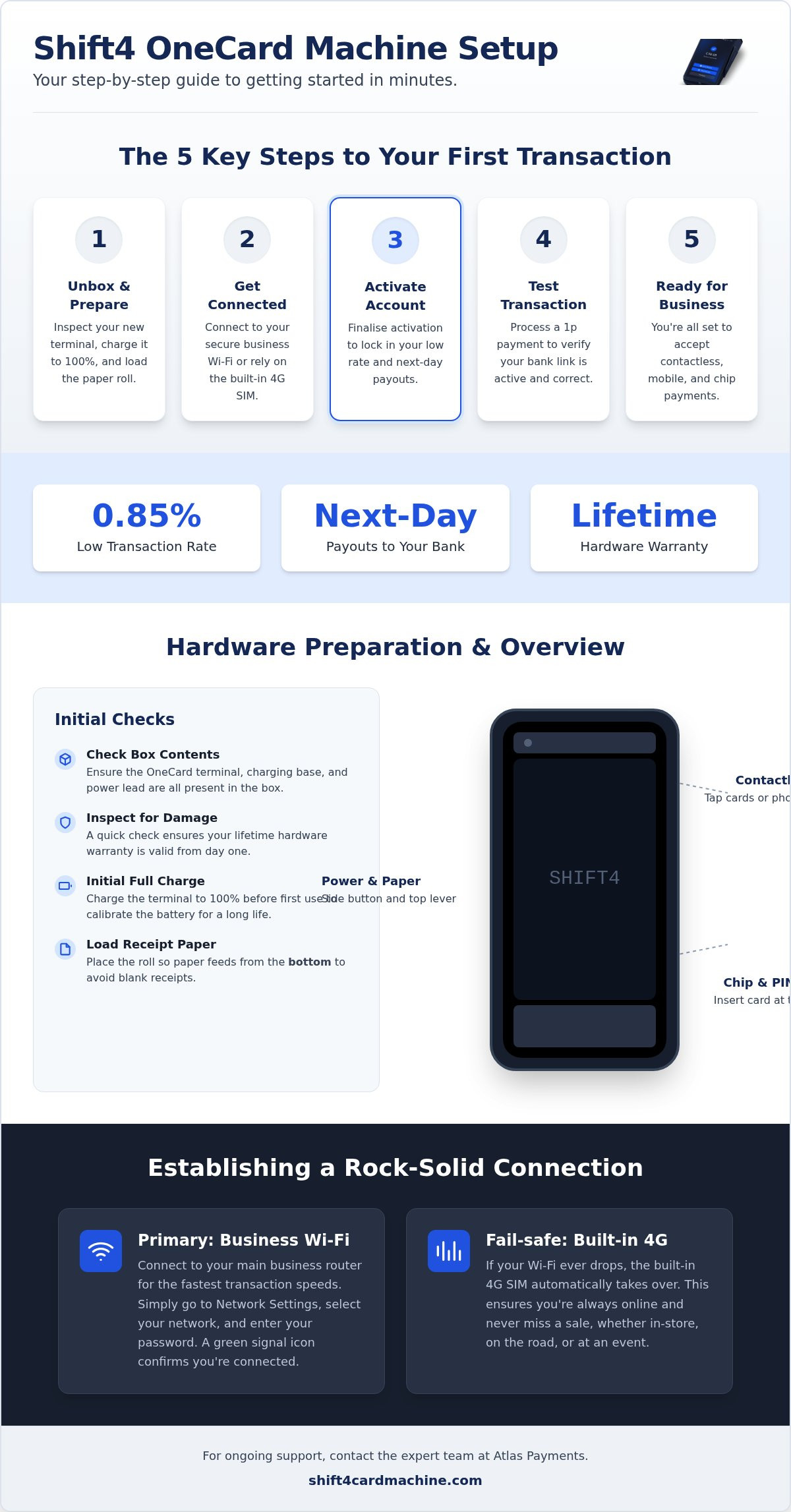
Your business journey with Atlas Payments begins the moment your parcel arrives. Unlike traditional financial institutions that often send refurbished or clunky hardware, your Shift4 OneCard is a sleek, modern terminal designed for immediate use. Before diving into the digital side of how to set up Shift4 card machine, take a moment to inspect the physical contents. Your box should contain the handheld OneCard terminal, a dedicated charging base, and a power lead. Confirming these components are present ensures you won't face any delays when you're ready to take that first payment.
Check the condition of your hardware immediately. Because this machine comes with a lifetime hardware warranty, ensuring it arrived in pristine condition is vital. If you notice any scuffs or damage, contact Jamie at Atlas Payments right away. This proactive approach protects your investment and ensures you're ready for the 0.85% rate and next-day payouts without any hardware-related hiccups. Once you're satisfied with the physical state of the device, you can begin the preparation process.
Hardware Overview and Battery Care
The OneCard is built for speed and durability. You'll find the chip reader at the bottom and the contactless reader integrated into the top screen area. For those times you need a direct physical connection, the charging port is easily accessible on the side. Since its founding, Shift4 Payments has focused on creating intuitive hardware that doesn't require a degree to operate. Understanding this physical layout is the first step in learning how to set up Shift4 card machine effectively.
Don't skip the initial charge. Plug your base into a power outlet and let the terminal reach 100% before your first trade. This simple step calibrates the battery, ensuring it lasts through your busiest trading days without dying mid-transaction. Keep an eye on the LED indicator colours. A steady light usually means you're good to go, whilst a flashing one suggests it's still drawing power. Starting with a full battery gives you the confidence to serve customers anywhere in your premises.
Loading the Receipt Paper Roll
Printing errors are a nuisance you don't need amongst a crowd of customers. To load your thermal paper, gently pull the lever at the top of the terminal to open the compartment. It's a simple mechanism, but treat it with care to maintain the integrity of the lid.
Place the roll inside so the paper feeds from the bottom of the roll. If the paper pulls from the top, you'll end up with blank receipts, which is a common setup mistake for busy merchants. Pull a small tail of paper out and snap the lid shut firmly. Once you've done this, hold the power button on the side until the Shift4 logo appears on the screen. Your hardware is now ready for the digital connection.
Establishing a Secure Connection via Wi-Fi and 4G
Once your terminal is powered on, the next vital step in learning how to set up Shift4 card machine is establishing a rock-solid connection. Without a stable link to the internet, you can't process transactions or access those crucial next-day payouts. Your OneCard terminal is designed to be versatile. It offers both Wi-Fi and 4G connectivity to ensure you never have to turn a customer away because of a technical glitch. This dual-path approach is what sets modern terminals apart from the old, unreliable units of the past.
Connecting to Your Business Wi-Fi
Access the network settings menu on your terminal to begin. The device will automatically scan for available networks; simply select your primary business router from the list. You'll need to enter your WPA2 security key using the on-screen keyboard. This ensures your data remains protected and aligns with UK Finance security standards for payment terminals. Once you've entered the password, look for the signal icon at the top of the display. When it turns green, you're successfully connected and ready to move forward.
Utilising the Built-in 4G SIM
Reliability is everything during a busy shift. Your OneCard comes equipped with a built-in 4G SIM that acts as a fail-safe. If your Wi-Fi falters, the terminal automatically switches to 4G, keeping your checkout line moving without a hitch. For mobile merchants or those trading at outdoor events, verify that data roaming is enabled in the settings to maintain a signal across different areas. This hybrid connectivity prevents lost sales during peak hours by ensuring your machine is always online. If you're still considering your options, you can explore the benefits of the OneCard to see how it fits your business model.
Don't just assume the connection is strong enough because the icon is green. Walk to the furthest point where you intend to take payments and check the signal bars. A weak signal can lead to slow processing times, which tests customer patience whilst they wait for a receipt. This allows you to organise your floor space effectively without worrying about signal dead zones. Testing the signal strength now prevents frustration later and is a key part of mastering how to set up Shift4 card machine for long-term success. With your connection secured, you're ready to activate your account and start trading.
Activating Your Merchant Account and 0.85% Rate
Now your terminal is online, it's time to bridge the gap between your hardware and your bank account. This is a pivotal moment in learning how to set up Shift4 card machine because it's where your 0.85% rate becomes official. You've already bypassed the frustration of monthly rental fees. Now, you're just a few taps away from securing the fastest payouts in the UK market. Have your unique merchant activation code ready; Jamie from Atlas Payments will have provided this during your initial application process.
Linking the Terminal to Your Profile
Linking the terminal to your profile is the most technical part of how to set up Shift4 card machine, but the on-screen wizard makes it remarkably straightforward. Follow the prompts to synchronise your hardware with the secure Shift4 gateway. Once you enter your code, the terminal will pull through your specific business details. Check that your business name appears correctly on the digital display. This ensures every receipt you print carries your brand accurately amongst your customers' records. This synchronisation only happens once; after this, your terminal remembers your profile for the life of the hardware.
This activation ensures your business operates within the legal framework of The Payment Services Regulations 2017, which governs how payment data is handled securely across the UK. Seeing your business name on the screen is your confirmation that the link is active and your transactions are protected by industry-standard protocols. It's a final layer of security that provides peace of mind before you process a single penny.
Setting Up Next-Day Payouts
The real advantage of the Shift4 OneCard is the speed of settlement. Whilst other providers might hold your funds for days, our integration prioritises your cash flow. Confirm your settlement window during the setup to ensure funds reach your account the following day as standard. You can verify that your bank details are authorised and ready for these transfers directly on the terminal or via your merchant portal. For a deeper dive into managing your account features, check out our Shift4 OneCard: The Ultimate Guide for UK Merchants 2026.
Once activated, you can view your transaction history in real-time. This transparency allows you to track your 0.85% rate on every sale, ensuring there are no hidden surprises. With your account linked and your payouts confirmed, your terminal is no longer just a piece of plastic; it's a fully functional gateway to your business's growth. You're now ready to move on to the final testing phase.
Processing Your First Transaction and Testing
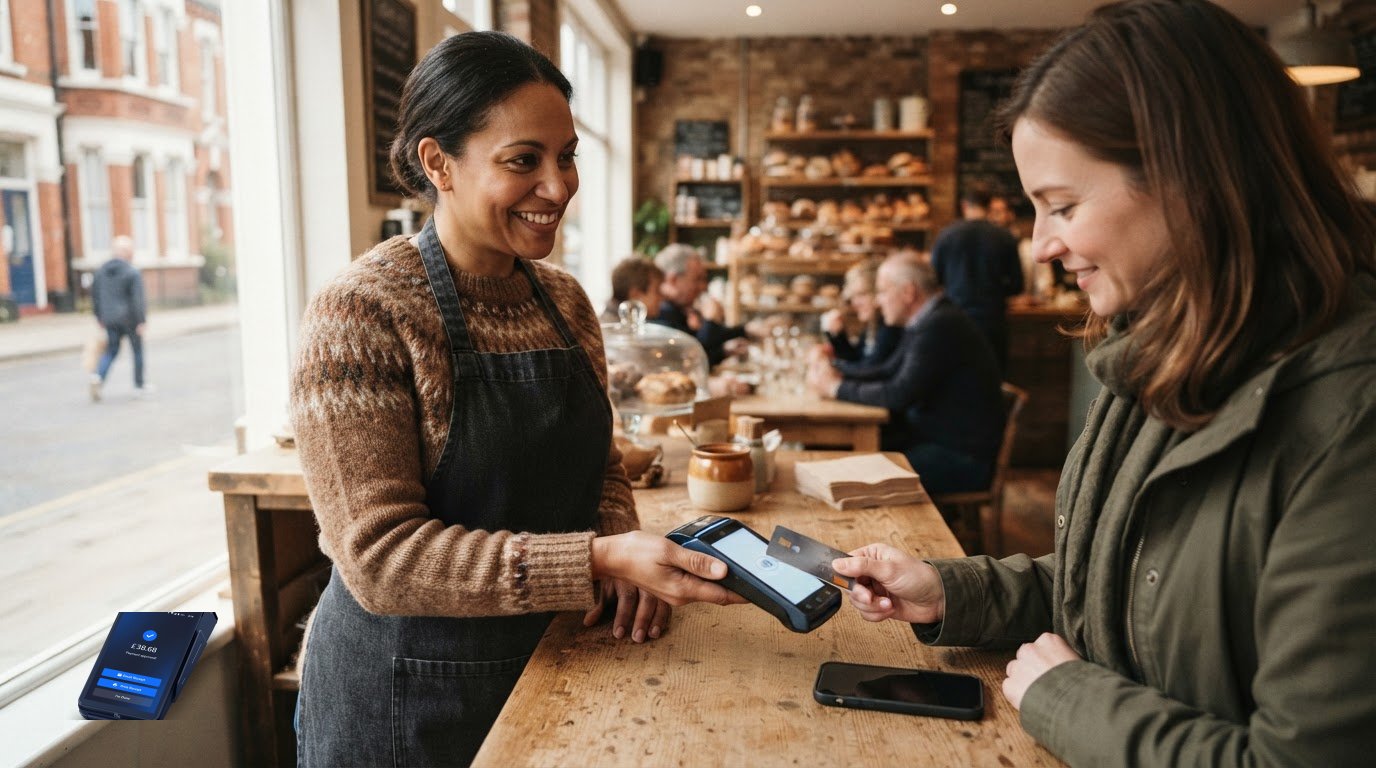
You've unboxed the hardware, secured your connection, and linked your account. Now comes the most satisfying part of learning how to set up Shift4 card machine: taking your first payment. This stage isn't just about seeing if the machine works; it's about verifying that the entire digital pipeline from your counter to your bank is clear. A quick test sale gives you the confidence to open your doors, knowing that every penny will settle correctly at your 0.85% rate.
Performing a Test Sale
Start with a simple 1p transaction. Enter £0.01 on the keypad and press the green "Enter" button. When the terminal prompts for payment, tap your own card or mobile phone against the screen. Wait for the "Authorised" message to appear. This message is your confirmation that the Shift4 gateway has successfully communicated with your bank. Once the transaction completes, the terminal will print a receipt. Check this slip carefully. It should display your correct business name and address, ensuring your records are accurate amongst your daily tallies. If everything looks right, you can void this transaction in the menu to keep your books tidy.
Managing Contactless and Mobile Payments
Speed is essential during busy periods. Encourage your customers to use contactless or mobile wallets like Apple Pay and Google Pay for faster service. As of March 2026, the rigid £100 contactless limit in the UK has been replaced by more flexible, bank-led limits. This means many of your customers may be able to tap for larger amounts than before. However, for very high-value sales, you'll still need to use the Chip and PIN method. Simply slot the card into the bottom of the OneCard terminal and hand it to the customer to enter their code securely. All these transaction types, whether tapped or keyed, are processed at your fixed 0.85% rate.
Mistakes happen in the heat of a busy shift. If you enter the wrong amount, you can void the sale immediately before the batch settles. For errors discovered later, the refund process is just as simple. Access the transaction menu, select "Refund", and enter the amount. This keeps your customer service levels high whilst ensuring your accounts remain balanced. Mastering these quick functions is the final step in your setup journey.
Ongoing Support and Troubleshooting for UK Merchants
Completing the initial setup is just the beginning of your journey with Atlas Payments. We don't believe in sending you a piece of hardware and leaving you to fend for yourself amongst technical manuals. Our goal is to ensure your payment processing remains the most reliable part of your business day. If you ever feel stuck or encounter a hurdle that wasn't covered in your guide on how to set up Shift4 card machine, you have direct access to Jamie at Atlas Payments for personalised assistance. This human connection is what sets our service apart from the clinical, automated support found at traditional banks.
Resolving Common Connectivity Issues
Even with a robust hybrid connection, local network environments can occasionally change. If your terminal displays a "No Connection" error whilst you're trading, the first step is always the simplest: a reboot. Most minor glitches are cleared by power cycling the device. If you've recently changed your router or updated your Wi-Fi password, you can easily refresh the network settings in the menu to reconnect. For more stubborn issues, a "soft reset" is your best tool. Simply hold the power button for ten seconds to restart the system. This process is entirely safe and won't cause you to lose any of your stored transaction data.
Accessing Your Lifetime Warranty
Your Shift4 OneCard is protected forever against hardware failure. We understand that a card machine is a workhorse, and even the best technology can eventually show signs of wear. If your terminal develops a fault or the battery no longer holds a charge, you don't need to worry about the cost of a new unit. Simply contact us to request a replacement. We'll organise a swap to get a fresh machine into your hands as quickly as possible. To ensure this process is seamless, keep your business contact details updated in your merchant portal so we can dispatch your hardware without delay.
For those looking to take their business further, the Shift4 Knowledge Base offers a wealth of information on advanced configuration. This includes deep dives into EPOS integration and customising your digital receipts. Once you've mastered how to set up Shift4 card machine for basic sales, these resources help you streamline your entire back-office operation. Whether you're troubleshooting a minor error or scaling your business with new software, our support structure is designed to keep you moving forward with total peace of mind.
Ready to Transform Your Checkout
Setting up your new terminal shouldn't be a hurdle. You've now seen that learning how to set up Shift4 card machine takes just a few minutes of your time. From the initial unboxing to running that first 1p test sale; every step is designed to get you trading without the usual technical headaches. You've secured a connection that won't fail you and confirmed a rate that keeps more profit in your pocket. It's about moving away from friction and toward a smoother daily operation.
No more waiting days for your money. No more hardware anxiety. With your 0.85% fixed transaction rate and next-day payouts active, your cash flow is finally under your control. The lifetime hardware warranty provides the ultimate peace of mind; you'll never be left stranded by a faulty device. You're now part of an exclusive group of UK merchants who prioritise transparency, speed, and reliable local support.
We're personally invested in your business success and can't wait to see you process that first official sale. Let's get your business moving today.
Frequently Asked Questions
How long does it take to set up the Shift4 OneCard machine?
It typically takes between five and ten minutes to get your terminal ready for its first sale. Once you've unboxed the hardware and established a secure connection, the activation process is nearly instantaneous. This efficiency ensures you can start trading almost immediately after your parcel arrives. Learning how to set up Shift4 card machine is designed to be a friction-free experience for busy UK business owners.
Do I need a separate merchant account to use the Shift4 card machine?
No, we provide full merchant account integration as part of your initial onboarding process. You don't need to shop around for a separate provider or deal with multiple contracts. Our team handles the banking link behind the scenes to ensure your terminal is ready to process payments at the 0.85% rate. This integrated approach simplifies your finances and ensures all your support comes from a single point of contact.
Can I use the card machine without a Wi-Fi connection?
Yes, you can process transactions using the built-in 4G SIM card if Wi-Fi is unavailable or falters. The Shift4 OneCard features hybrid connectivity, meaning it automatically switches to mobile data to prevent lost sales during network outages. This is particularly useful for mobile merchants or outdoor events where a router isn't accessible. You can trade with confidence across the UK, knowing your connection is always backed up by a reliable signal.
What should I do if my Shift4 machine will not turn on?
First, check that the terminal is correctly seated on its charging base and that the power lead is securely plugged in. If the battery has completely drained, it may take a few minutes of charging before the Shift4 logo appears. If the device remains unresponsive after a full charge, your lifetime hardware warranty covers a free replacement. Simply contact Jamie at Atlas Payments to organise a swap and keep your business running smoothly.
How do I update the software on my Shift4 terminal?
Software updates are handled automatically by the terminal whilst it is connected to Wi-Fi or 4G. You don't need to manually download files or perform complex technical steps to keep your machine secure. The system typically updates during quiet periods to avoid interrupting your trade. This ensures your device always meets the latest UK security standards and continues to process transactions at the 0.85% rate without any manual intervention.
Is there a cost for the 4G data used by the card machine?
There is no additional monthly cost for the 4G data used by your Shift4 OneCard. We provide the machine and its connectivity without any monthly rental fees, allowing you to focus on your sales. This means you can use the mobile network as a primary connection or a backup without worrying about unexpected data bills. It's part of our commitment to transparent pricing and removing hidden complications for UK small businesses.
How do I know if my first transaction was successful?
A successful transaction is confirmed when the terminal displays an "Authorised" message and prints a physical receipt. You can also verify the sale in real-time through your merchant portal. Performing a 1p test sale is the best way to confirm your setup is correct. Once that receipt prints with your business details, you have total peace of mind that your terminal is correctly linked to your account and ready for trade.
Who do I contact if I have trouble during the setup process?
You can contact Jamie at Atlas Payments for personalised support if you encounter any issues whilst learning how to set up Shift4 card machine. Unlike anonymous call centres, we provide a direct, human connection to ensure your business stays online. Whether you have a question about your 0.85% rate or need help with Wi-Fi settings, our team is here to guide you through every step of the activation process.
Frequently Asked Questions
It typically takes between five and ten minutes to get your terminal ready for its first sale. Once you've unboxed the hardware and established a secure connection, the activation process is nearly instantaneous. This efficiency ensures you can start trading almost immediately after your parcel arrives. Learning how to set up Shift4 card machine is designed to be a friction-free experience for busy UK business owners.
No, we provide full merchant account integration as part of your initial onboarding process. You don't need to shop around for a separate provider or deal with multiple contracts. Our team handles the banking link behind the scenes to ensure your terminal is ready to process payments at the 0.85% rate. This integrated approach simplifies your finances and ensures all your support comes from a single point of contact.
Yes, you can process transactions using the built-in 4G SIM card if Wi-Fi is unavailable or falters. The Shift4 OneCard features hybrid connectivity, meaning it automatically switches to mobile data to prevent lost sales during network outages. This is particularly useful for mobile merchants or outdoor events where a router isn't accessible. You can trade with confidence across the UK, knowing your connection is always backed up by a reliable signal.
First, check that the terminal is correctly seated on its charging base and that the power lead is securely plugged in. If the battery has completely drained, it may take a few minutes of charging before the Shift4 logo appears. If the device remains unresponsive after a full charge, your lifetime hardware warranty covers a free replacement. Simply contact Jamie at Atlas Payments to organise a swap and keep your business running smoothly.
Software updates are handled automatically by the terminal whilst it is connected to Wi-Fi or 4G. You don't need to manually download files or perform complex technical steps to keep your machine secure. The system typically updates during quiet periods to avoid interrupting your trade. This ensures your device always meets the latest UK security standards and continues to process transactions at the 0.85% rate without any manual intervention.
There is no additional monthly cost for the 4G data used by your Shift4 OneCard. We provide the machine and its connectivity without any monthly rental fees, allowing you to focus on your sales. This means you can use the mobile network as a primary connection or a backup without worrying about unexpected data bills. It's part of our commitment to transparent pricing and removing hidden complications for UK small businesses.
A successful transaction is confirmed when the terminal displays an "Authorised" message and prints a physical receipt. You can also verify the sale in real-time through your merchant portal. Performing a 1p test sale is the best way to confirm your setup is correct. Once that receipt prints with your business details, you have total peace of mind that your terminal is correctly linked to your account and ready for trade.
You can contact Jamie at Atlas Payments for personalised support if you encounter any issues whilst learning how to set up Shift4 card machine. Unlike anonymous call centres, we provide a direct, human connection to ensure your business stays online. Whether you have a question about your 0.85% rate or need help with Wi-Fi settings, our team is here to guide you through every step of the activation process.
Related articles

Ready for your free machine?
No rental. No catch. Apply in 2 minutes.