
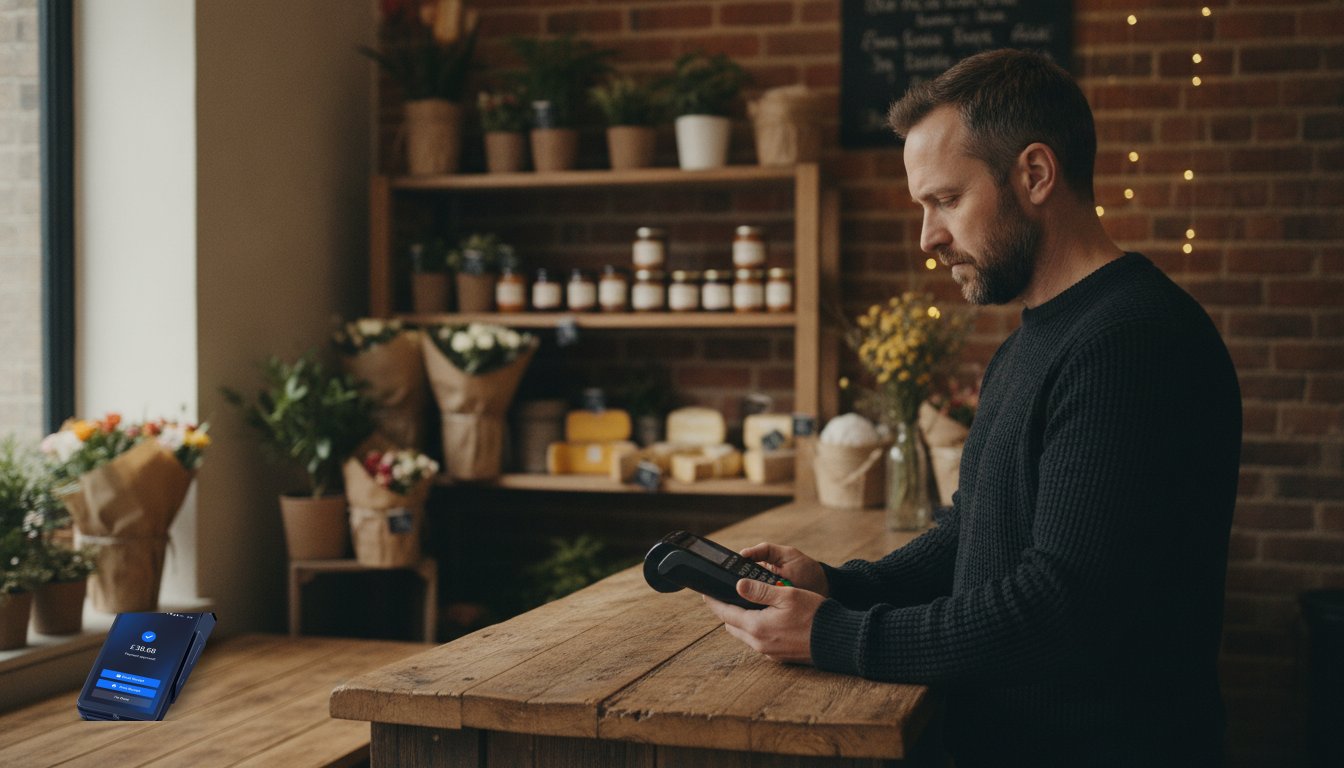
Imagine it's the peak of the Saturday lunch rush and your queue is stretching out the door. Suddenly, your screen freezes or displays a cryptic error message you've never seen before. It's a moment of pure friction that every UK business owner dreads. You shouldn't have to choose between losing revenue and spending hours on hold with technical support during your busiest trading window.
We understand that a broken terminal feels like a business emergency. You need a fast, reliable way to process payments and secure those vital next-day payouts. This Shift4 Card Machine troubleshooting guide is your shortcut to a working terminal. We've stripped away the technical jargon to provide a straightforward manual that gets your Shift4 OneCard Machine back online in minutes. No fluff. No confusion.
In this guide, we'll show you how to distinguish between a simple Wi-Fi glitch and a genuine hardware fault. You'll learn the exact steps to reset your connection and discover why your lifetime hardware warranty means you're never truly stuck. Let's get your payments flowing again so you can focus on your customers with total peace of mind.
Key Takeaways
- Learn how to decode common on-screen messages and distinguish between bank-side declines and terminal faults to save valuable trading time.
- Use this Shift4 Card Machine troubleshooting guide to master hybrid connectivity, ensuring you can switch between 4G and Wi-Fi for uninterrupted service.
- Understand how to resolve card-read errors and batch closure issues to ensure your next-day payouts are never delayed by technical hitches.
- Discover professional cleaning techniques and battery care tips that protect your hardware and help you leverage your lifetime hardware warranty.
- Identify the exact moment to stop DIY fixes and escalate to UK-based support with the correct information for a swift resolution.
Common Shift4 OneCard Machine Error Codes and Meanings
Seeing an error code during a busy shift can feel like a setback, but most messages are simply your payment terminal communicating a specific status. This Shift4 Card Machine troubleshooting guide helps you distinguish between a minor hiccup and a genuine hardware fault. Understanding these codes prevents unnecessary panic and keeps your queue moving. It's about clarity, not complexity.
Errors generally fall into two categories: external issues related to the customer's bank and internal issues with your terminal or account setup. For example, an "Invalid Merchant ID" message usually suggests a configuration error in your account integration. It isn't a broken machine; it's a handshake problem between your terminal and the Shift4 network. Severity levels range from "Information" messages, like a low battery warning, to "Critical" system faults. Knowing the difference saves you from calling technical support for a simple fix.
Transaction Declined vs. Technical Failure
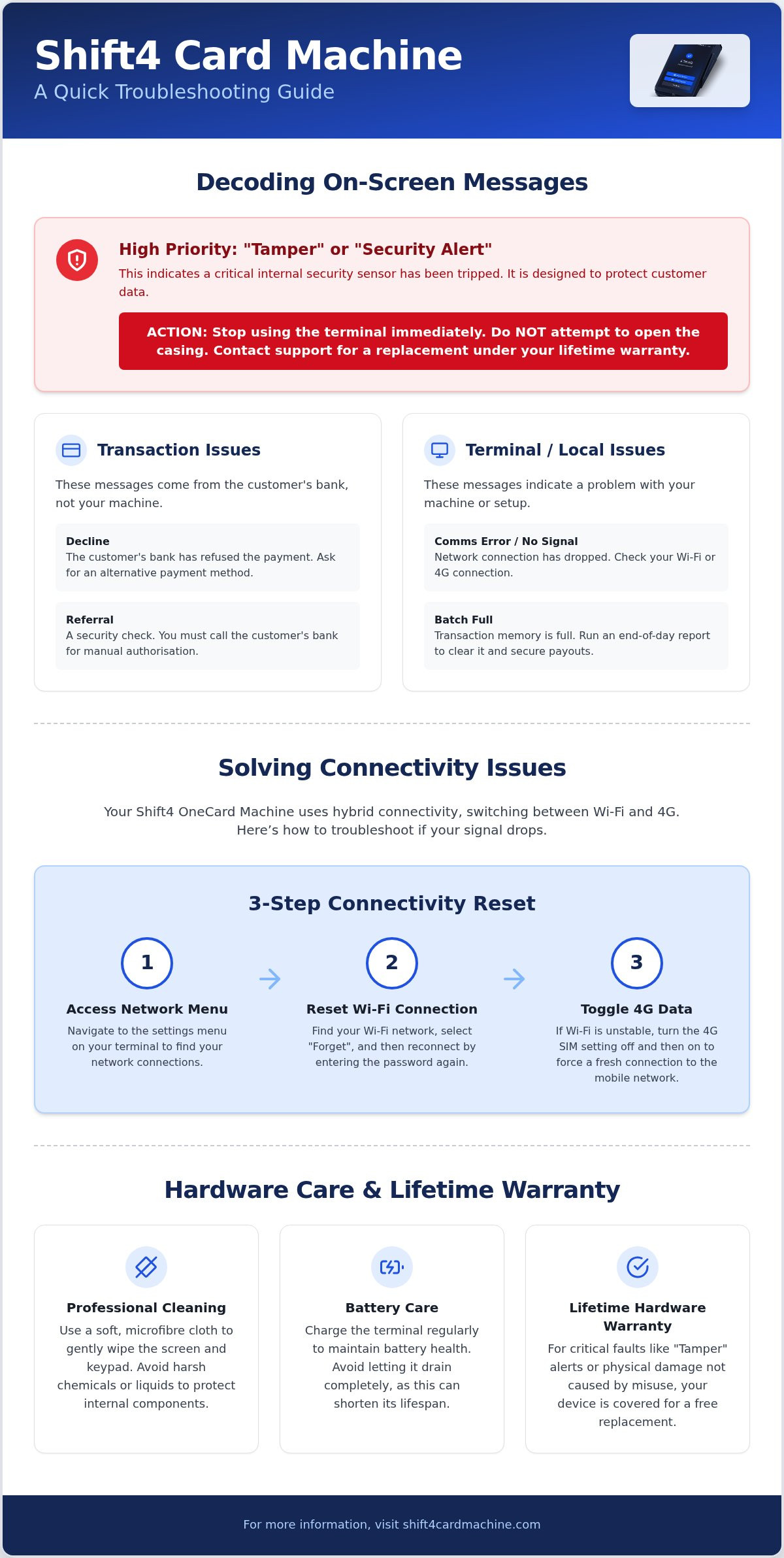
A "Decline" message isn't a machine error. It's the issuer telling you they won't authorise the payment. If the screen says "Comms Error" or "No Signal", the fault is local. This usually means your Wi-Fi or 4G connection has dropped. Sometimes you'll see a "Referral" message. This isn't a failure; it's a security check. You'll need to call the customer's bank for a manual authorisation code to complete the sale.
- Decline: Customer's bank issue. Ask for another card or payment method.
- Comms Error: Network issue. Check your router or switch to the 4G backup.
- Batch Full: Your machine has reached its transaction memory limit. Trigger a manual end-of-day report to clear the space. This is vital because your next-day payouts rely on these batches being closed correctly.
Software Update and "Tamper" Messages
If your machine displays "Tamper" or "Security Alert", stop immediately. These are high-priority security triggers designed to protect customer data. A "Tamper" message usually means the internal security sensors have been tripped. It's a critical fault that typically requires a replacement unit. Because you have a lifetime hardware warranty, you don't need to worry about the cost of a new device. Don't ever attempt to open the machine casing yourself. Doing so voids your warranty and could compromise sensitive payment data.
Occasionally, your OneCard Machine might seem unresponsive whilst it downloads firmware updates. These are essential for security and performance. Don't pull the power cable or force a restart during this process. Let the progress bar finish. A few minutes of patience ensures your terminal remains compliant with the latest UK payment standards and operates at peak speed.
Solving Connectivity Issues: Wi-Fi and 4G Troubleshooting
Reliable connectivity is the backbone of your business. Without it, payments stall and queues grow. The Shift4 OneCard Machine is designed for UK merchants who need constant uptime. Unlike older terminals that rely on a single connection, this device uses hybrid connectivity. It switches between Wi-Fi and 4G mobile data automatically. This Shift4 Card Machine troubleshooting guide ensures you know how to manage these links when the signal drops.
Distinguishing between "No Signal" and "Authentication Failed" is the first step. "No Signal" usually means you are too far from your router or the 4G tower. "Authentication Failed" indicates a password error or a security block on your network. Under the Payment Services Regulations 2017, merchants must ensure their systems are robust enough to handle transactions securely. Maintaining a strong connection isn't just about convenience; it's about compliance and reliability. If you find your current setup frequently dropping, you might want to review your hardware options to ensure you have the latest hybrid technology.
How to Reset Your Connectivity Settings
Sometimes the machine just needs a fresh start. Follow these steps to clear the digital cobwebs. First, access the network settings menu on your OneCard Machine. Locate your primary Wi-Fi network and select "Forget". Reconnect by entering your password carefully. If the Wi-Fi remains unstable, toggle the 4G SIM settings off and then back on. This forces the mobile data link to refresh and find the strongest local mast.
- Access the Network Menu via the settings icon.
- Forget and reconnect to your Wi-Fi to clear IP conflicts.
- Toggle 4G mobile data to trigger a fresh network handshake.
Optimising Your Signal Strength
Environmental factors often block signals in UK retail centres. Thick stone walls, metal counters, and even large mirrors can disrupt Wi-Fi. Place your charging base in an open area, away from heavy machinery or microwave ovens. If your Wi-Fi is patchy during peak hours, manually switch to 4G. This keeps your transaction speed high whilst your main network is congested. Check your router for "dead zones" and consider a Wi-Fi extender if your terminal needs to travel far from the till point.
Payment Processing Failures and Declined Transactions
A failed transaction shouldn't mean a lost sale. You need answers, not more questions. This Shift4 Card Machine troubleshooting guide helps you navigate these moments without losing your cool. When a machine freezes at the "Authorising" stage, it is usually a temporary network timeout. Don't restart the device immediately. Wait for the terminal to time out naturally. This prevents the "Duplicate Transaction" warning that occurs when you try to run the same card twice too quickly. If a card-read error occurs, identify the method. Contactless often fails due to the £100 limit or local signal interference. Chip errors usually mean the card or the reader is dirty. Magstripe is your final fallback, but it is the least secure option for UK merchants.
Protecting your customers is paramount. If you see a duplicate warning, always check your transaction history on the device before attempting the sale again. Following UK Payment Systems Regulator guidance ensures you stay compliant whilst managing these disputes. Handling these errors correctly protects your business from administrative fees. It also keeps your merchant account in good standing. Transparency in your payment behaviour builds trust with your clientele. Your terminal is a sophisticated tool. Treat it with the same care as your till.
Manual Entry and Fallback Procedures
If the chip reader fails repeatedly, you might need to use manual entry. On the OneCard Machine, this involves typing the card number directly into the keypad. Use this sparingly. "Card Not Present" protocols are stricter because the risk of fraud is significantly higher. Always verify the customer's identity if you are forced to use fallback procedures. Physical card reads via contactless or chip are always the safer, preferred route for retail security. If the reader itself is the issue, your lifetime hardware warranty covers a replacement unit.
Batching and Settlement Issues
Your Shift4 service promises next-day payouts, but this depends on successful batching. Most machines settle automatically at a set time each night. If yours fails, you must trigger a manual settlement. Check your terminal's "Totals" or "End of Day" menu to confirm the batch has reached the Shift4 gateway. If a payout is missing, the first thing to check is whether the previous day's batch actually closed. A functioning machine is the only way to ensure your cash flow stays steady. Don't let a simple settlement error delay your hard-earned revenue.
Hardware Care: Maintenance and the Lifetime Warranty
Your hardware is the physical heartbeat of your business. If the terminal fails, the queue stops moving and revenue drops. Maintaining your device isn't just about aesthetics; it's about protecting your ability to trade. This Shift4 Card Machine troubleshooting guide focuses on simple, proactive steps to keep your kit in top condition. You don't need a technical background to keep your terminal running smoothly. You just need a consistent care routine that prevents common wear and tear from becoming a business-stopping fault.
Cleaning your Shift4 OneCard Machine requires a gentle touch. Never use wet wipes, sprays, or harsh chemicals directly on the screen or card slots. These liquids can seep into the internal sensors and cause permanent damage. Instead, use a dry, lint-free microfibre cloth to remove dust and fingerprints. For the chip reader, a specialised cleaning card can clear debris that causes the read errors we discussed in previous sections. Regular maintenance reduces the friction of daily use and ensures your customers enjoy a seamless checkout experience every time.
Charging and Power Troubleshooting
Battery health is vital for handheld terminals. To ensure your OneCard Machine lasts a full shift, avoid leaving it on the charging base 24/7. Constant "trickle charging" can degrade the battery cell over time. If your machine won't turn on, check the charging pins for bits of food, flour, or dust. This is especially common in hospitality environments. Use a soft brush to clear any blockages. If the screen is frozen and won't respond to the power button, perform a hard reboot. Hold the power button and the yellow "Cancel" key simultaneously for ten seconds. This safely restarts the system without affecting your transaction data.
Claiming Your Lifetime Warranty Replacement
It isn't always possible to fix a fault with a reboot. Sometimes, internal components simply fail. Most providers leave you liable for hardware costs after the first year. We take a different approach. Your merchant agreement includes a lifetime hardware warranty. This means if your OneCard Machine develops a genuine technical fault, you aren't left with a bill for a new device. It's a partnership designed to remove the anxiety of hardware ownership.
To request a replacement, contact support with your terminal serial number ready. We'll help you determine if the fault is terminal. Once confirmed, a replacement unit is organised to ensure business continuity. You don't have to worry about long-term downtime or hidden repair fees. This protection is a core part of our commitment to your success.
When to Contact Support and How to Upgrade
Most issues resolve with a simple reset or a quick settings tweak. However, you shouldn't spend your entire shift playing technician. If you have followed this Shift4 Card Machine troubleshooting guide and the screen remains blank or the "Tamper" message persists, it is time to step away. Recognising the limit of DIY fixes saves you from unnecessary stress and lost revenue. Before you pick up the phone, check for national service outages. Sometimes the issue isn't your hardware; it's a wider network problem affecting merchants across the UK. A quick glance at the status page provides immediate clarity.
Preparation makes support calls faster. Have your terminal serial number and the exact error code ready. Knowing the time of your last successful transaction also helps our team trace the fault. We don't believe in leaving you stranded in an anonymous ticketing system. You deserve a direct line to experts who understand the local trading environment. If your business is growing, it might also be the right moment to review your current setup. Relying on a single device creates a single point of failure. Adding a second terminal ensures that even if one unit needs a warranty replacement, your sales never stop.
Getting Direct Support for Your Business
We provide more than just a machine. We provide a partnership. You have access to authorised Shift4 partners who prioritise your uptime. Having a dedicated contact like Jamie means you aren't explaining your business history to a stranger every time you call. It's a personal approach that traditional banks simply cannot match. You can also use your online portal to track transaction health in real-time. This data helps you spot patterns in declines or connectivity drops before they become critical failures. It is about staying one step ahead of technical friction.
Future-Proofing Your Payment System
Technology moves fast. Your payment system should keep up. Upgrading to the latest hybrid connectivity ensures you are always ready to take a payment, regardless of Wi-Fi stability. For larger venues or busy retail centres, linking multiple OneCard Machines creates a robust network that handles high volumes with ease. This redundancy is the ultimate insurance policy for your cash flow. It keeps your next-day payouts predictable and your customers happy. If you are still using older, slower hardware, now is the time to make the switch to a more reliable solution.
Secure Your Payments and Protect Your Revenue
Technical glitches shouldn't stand in the way of your success. This Shift4 Card Machine troubleshooting guide provides the clarity you need to resolve common errors and connectivity issues in seconds. You now understand how to maintain your hardware and when to rely on professional support. By removing the mystery behind cryptic error codes, you can keep your queues moving and your customers happy.
We believe in providing more than just a service. We offer a partnership built on transparency and reliability. You don't have to settle for complex fees or lacklustre support. With a fixed transaction rate of 0.85% and the security of a lifetime hardware warranty, you can focus on growing your business without the fear of hidden costs or hardware failure. It is about removing friction and creating a path for steady, uninterrupted growth.
Trade with peace of mind knowing that an authorised UK Shift4 Partner is always in your corner. Your business deserves a payment system that works as hard as you do. Let's get your terminal back to peak performance today.
Frequently Asked Questions
Why is my Shift4 card machine displaying "Comms Error"?
A "Comms Error" indicates that your terminal cannot reach the payment gateway. Check your router first. This Shift4 Card Machine troubleshooting guide recommends moving the terminal closer to your Wi-Fi source or checking if your 4G signal is blocked by local interference. If your internet is working on other devices, try restarting the terminal to refresh the connection. It's usually a temporary glitch rather than a hardware failure.
How do I perform a hard reset on my Shift4 OneCard Machine?
To perform a hard reset, hold the power button and the yellow "Cancel" key simultaneously for ten seconds. This forces the system to reboot safely without losing your transaction data. It is the best way to unfreeze a stuck screen or clear a persistent error. Don't pull the battery out unless instructed by support. A simple reboot often fixes software loops that cause the terminal to become unresponsive during busy trading periods.
What should I do if my card machine says "Tamper Detected"?
A "Tamper Detected" message is a security trigger that locks the machine to protect cardholder data. This usually happens if the terminal is dropped or the casing is compromised. You cannot fix this yourself. Because you have a lifetime hardware warranty, you should contact support immediately to organise a replacement unit. Don't attempt to bypass this error. It is a critical safety feature designed for your protection and customer security.
How can I switch my card machine from Wi-Fi to 4G?
Your OneCard Machine should switch to 4G automatically if the Wi-Fi fails. To do this manually, enter the network settings menu and toggle the Wi-Fi off. The terminal will then search for the strongest available mobile data signal. This hybrid connectivity is a core feature for UK merchants who cannot afford downtime. It ensures you can continue taking payments even if your local broadband provider has a temporary service outage.
Does the lifetime warranty cover accidental damage to the machine?
The lifetime hardware warranty covers all internal technical faults and component failures. It doesn't typically cover accidental damage like screen smashes or liquid spills. We provide this warranty to give you peace of mind regarding the natural lifespan of the device. If your machine stops working due to a software glitch or a worn-out chip reader, we'll replace it. Always treat your terminal with care to avoid avoidable repair costs.
Why are my transactions not settling for next-day payout?
Transactions won't settle if the batch hasn't been closed correctly. Check your "Totals" menu to see if there is an open batch waiting for settlement. Your next-day payouts rely on the terminal successfully communicating with the Shift4 gateway at the end of each day. If the automatic settlement fails, trigger it manually. Also, ensure your bank details are verified in the merchant portal to prevent any administrative delays to your funds.
How do I clean the chip reader on my Shift4 terminal?
Use a specialised dry cleaning card to clear the chip reader sensors. Avoid using folded paper or metal objects, as these can scratch the delicate internal contacts. If you don't have a cleaning card, a quick blast of compressed air can remove dust or flour. Keeping this area clean prevents the "Card Read Error" messages that slow down your service. Regular maintenance is the simplest way to extend the life of your hardware.
What happens if my card machine runs out of paper whilst printing a receipt?
If your machine runs out of paper during a receipt, simply fit a new roll and the terminal will usually prompt you to reprint. You won't lose the transaction data. The payment has already been authorised by the bank before the printing begins. You can also log into your merchant portal to email a digital receipt to the customer if the printer mechanism itself has jammed. It's a minor hiccup that doesn't affect your revenue.
Frequently Asked Questions
A "Comms Error" indicates that your terminal cannot reach the payment gateway. Check your router first. This Shift4 Card Machine troubleshooting guide recommends moving the terminal closer to your Wi-Fi source or checking if your 4G signal is blocked by local interference. If your internet is working on other devices, try restarting the terminal to refresh the connection. It's usually a temporary glitch rather than a hardware failure.
To perform a hard reset, hold the power button and the yellow "Cancel" key simultaneously for ten seconds. This forces the system to reboot safely without losing your transaction data. It is the best way to unfreeze a stuck screen or clear a persistent error. Don't pull the battery out unless instructed by support. A simple reboot often fixes software loops that cause the terminal to become unresponsive during busy trading periods.
A "Tamper Detected" message is a security trigger that locks the machine to protect cardholder data. This usually happens if the terminal is dropped or the casing is compromised. You cannot fix this yourself. Because you have a lifetime hardware warranty, you should contact support immediately to organise a replacement unit. Don't attempt to bypass this error. It is a critical safety feature designed for your protection and customer security.
Your OneCard Machine should switch to 4G automatically if the Wi-Fi fails. To do this manually, enter the network settings menu and toggle the Wi-Fi off. The terminal will then search for the strongest available mobile data signal. This hybrid connectivity is a core feature for UK merchants who cannot afford downtime. It ensures you can continue taking payments even if your local broadband provider has a temporary service outage.
The lifetime hardware warranty covers all internal technical faults and component failures. It doesn't typically cover accidental damage like screen smashes or liquid spills. We provide this warranty to give you peace of mind regarding the natural lifespan of the device. If your machine stops working due to a software glitch or a worn-out chip reader, we'll replace it. Always treat your terminal with care to avoid avoidable repair costs.
Transactions won't settle if the batch hasn't been closed correctly. Check your "Totals" menu to see if there is an open batch waiting for settlement. Your next-day payouts rely on the terminal successfully communicating with the Shift4 gateway at the end of each day. If the automatic settlement fails, trigger it manually. Also, ensure your bank details are verified in the merchant portal to prevent any administrative delays to your funds.
Use a specialised dry cleaning card to clear the chip reader sensors. Avoid using folded paper or metal objects, as these can scratch the delicate internal contacts. If you don't have a cleaning card, a quick blast of compressed air can remove dust or flour. Keeping this area clean prevents the "Card Read Error" messages that slow down your service. Regular maintenance is the simplest way to extend the life of your hardware.
If your machine runs out of paper during a receipt, simply fit a new roll and the terminal will usually prompt you to reprint. You won't lose the transaction data. The payment has already been authorised by the bank before the printing begins. You can also log into your merchant portal to email a digital receipt to the customer if the printer mechanism itself has jammed. It's a minor hiccup that doesn't affect your revenue.
Related articles


Ready for your free machine?
No rental. No catch. Apply in 2 minutes.